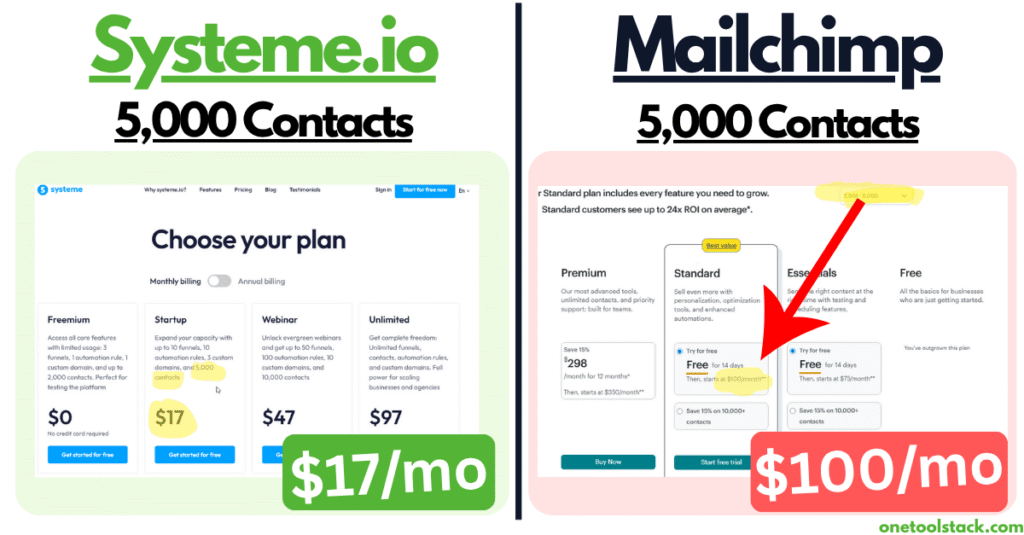
Mailchimp wants $100/month for 5,000 contacts.
Systeme.io charges $17/month for 5,000 contacts AND gives you courses, funnels, webinars, a blog, and affiliate management.
That’s not a pricing difference. That’s highway robbery.
I spent 6 hours over 3 days (November 4-8) testing Mailchimp expecting to find something—ANYTHING—that justified paying 6X more. I kept waiting for that “wow” moment where everything clicked and I understood why Mailchimp has been around since 2001.
It never came.
This isn’t a hit piece. Mailchimp isn’t broken. The emails look nice. The forms work fine. But after clicking through every feature, building test pages, and running the numbers three different ways, I couldn’t find a single reason to recommend it over Systeme.io—especially at Mailchimp’s pricing.
Here’s the uncomfortable truth: Mailchimp is banking on brand recognition to justify premium pricing for basic features. They’ve been around forever. They’re “the email marketing company.” But being famous doesn’t make you the best value in 2025.
I tested both. I have the screenshots. I did the math. Let me show you why I’m staying with Systeme.io and why you probably should too (unless you’re in one very specific situation I’ll cover later).
TL;DR: Don’t Have Time? Here’s Your Answer
Choose Systeme.io IF:
- ✅ You’re pre-revenue or under $10K/month consistently
- ✅ You need more than just email (courses, funnels, webinars)
- ✅ You want unlimited email sends without daily caps
- ✅ Budget is your primary concern (save $696-996/year)
- ✅ You’re building a complete online business, not just a newsletter
Choose Mailchimp IF:
- ✅ You’re an established physical product brand (clothing, jewelry, home goods)
- ✅ Email is your PRIMARY sales channel (80%+ of revenue)
- ✅ You already have an existing website (Shopify, WooCommerce)
- ✅ You need specific ecommerce integrations that only Mailchimp offers
- ✅ You value premium email templates over all-in-one features
My verdict: For 95% of solopreneurs and small businesses, Mailchimp is overpriced and under-featured. Stay with Systeme.io.
The math: At 5,000 contacts:
- Mailchimp Standard: $100/mo ($1,200/year)
- Systeme.io Startup: $17/mo ($204/year)
- You save $996/year
That’s $996 you could spend on ads, a designer, a VA, or literally anything that actually grows your business.
Read my full Systeme.io review →
How I Actually Tested Mailchimp (Not Just Reading Marketing Pages)
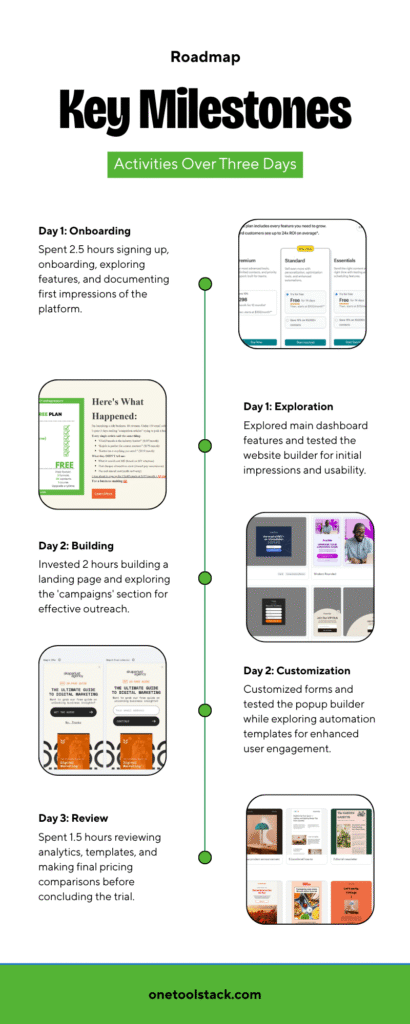
I didn’t sign up, click around for 20 minutes, and call it a day. I spent 6 hours over 3 days methodically testing every feature Mailchimp advertises on their free plan and paid tiers.
Here’s what I actually did:
Day 1 (November 4, 2025) – 2.5 hours
- Signed up for free plan (15 min onboarding)
- Explored dashboard and main features
- Tested website builder (30 min)
- Attempted to use Creative Assistant AI (failed after 3 min)
- Browsed email template library
- Documented first impressions
Day 2 (November 6, 2025) – 2 hours
- Built landing page / explored “campaigns” section
- Created and customized forms
- Tested popup builder (beta)
- Reviewed automation templates (locked for free tier)
- Explored survey feature templates
- Calculated pricing across different contact tiers
Day 3 (November 8, 2025) – 1.5 hours
- Reviewed analytics (sample data only on free)
- Compared premium email templates vs free templates
- Tested integrations list
- Made final pricing comparisons
- Documented verdict
Total time invested: 6 hours across 3 days
What I was looking for:
- Are the features actually better than Systeme.io?
- Does the pricing make sense at different list sizes?
- What’s locked behind the paywall vs available on free?
- Would I personally pay $20-$135/month for this?
Spoiler: The answer to that last question was a hard no.
My First Impression: It’s… UPS Colors?
Look, I know this sounds petty, but the first thing I thought when I landed on Mailchimp’s homepage was “Why does this remind me of UPS?”
The brown and yellow color scheme is… a choice. Not a good or bad choice, just a choice. But it set the tone for the entire experience: functional, corporate, uninspiring.
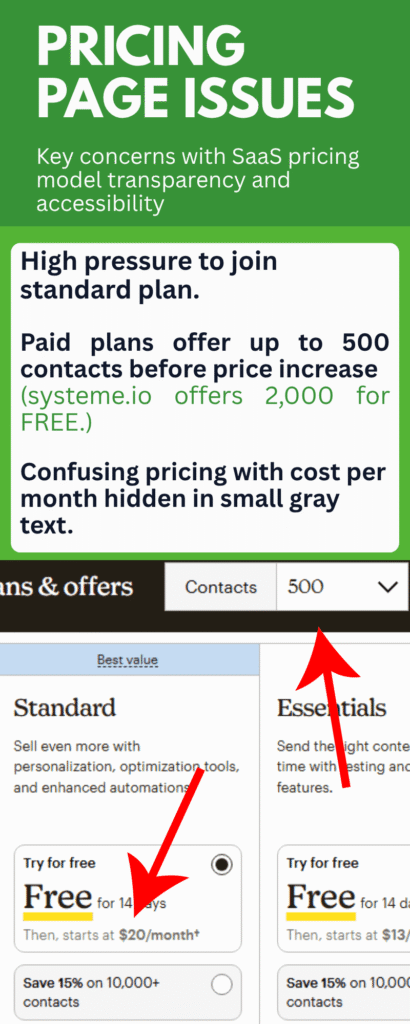
The pricing page is a mess. They show you the HIGHEST tier plans first (reading left to right), which is backwards from how literally every other SaaS company does it. You have to scroll right to find the free plan, which feels intentional. “Maybe they won’t notice the free option if we bury it on the right…”
Key observation: The pricing starts at 500 contacts for paid plans, not 1,000. This is important.
Free tier: 1,000 contacts Paid tiers START at: 500 contacts
So the moment you’re ready to upgrade, you’re actually downgrading your contact capacity unless you jump to the 1,500 contact tier. Weird flex, but okay.
The Sign-Up Experience: “Continue Free” is Buried
Sign-up took about 15 minutes, which is longer than it should be but not terrible.
The onboarding questions:
- Who are you and your business?
- What’s your contact list size?
- What’s your industry?
- What are your goals?
- What features matter most?
Standard stuff. Nothing offensive. Then I hit the upsell page.
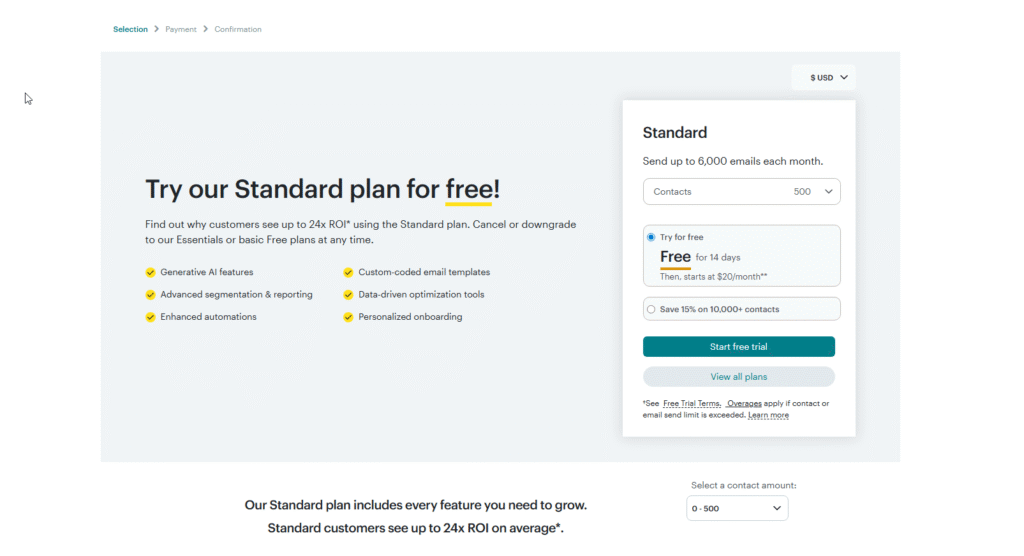
“TRY FREE STANDARD PLAN FOR 14 DAYS THEN $20/MO”
Here’s the thing: I couldn’t find a way to decline. There’s no “No thanks” button. No “Continue with free” link at the top.
I had to scroll ALL THE WAY DOWN past the full pricing table to find a tiny “Continue free plan” button at the bottom right.
This is intentionally designed to get you to accidentally start a paid trial.
Don’t love that.
After I finally found the buried button, I was in. Email verification was quick (maybe 2 minutes). Total time from landing page to dashboard: ~15 minutes.
Feature-by-Feature: What I Actually Tested
🌐 Website Builder (Rating: 3/10)
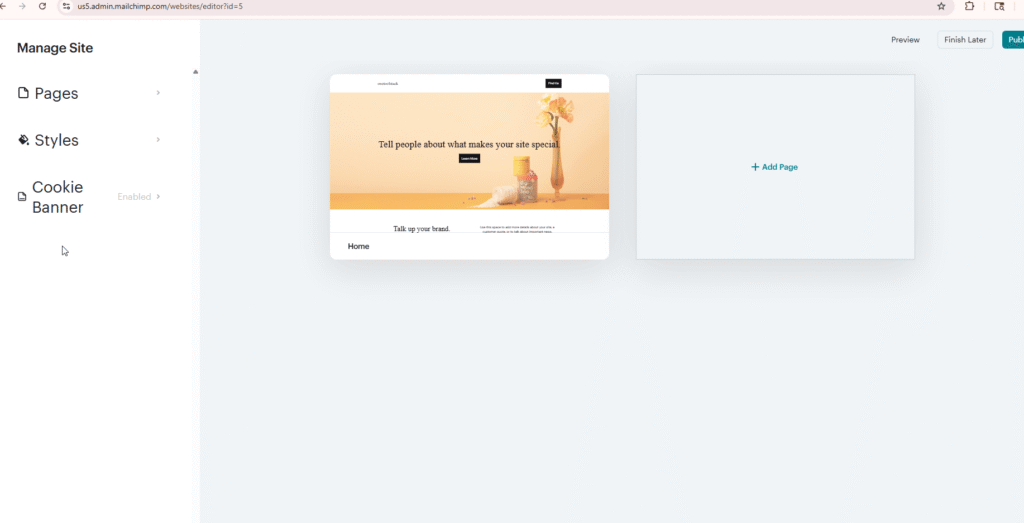
Mailchimp advertises a “website builder” but it’s… not great.
What I found:
- ONE starter template (that’s it, just one)
- Then you’re on your own with a blank canvas
- Basic drag-and-drop editor
- Limited styling options
- Mailchimp-branded URL (you can connect a custom domain on paid)
I spent 30 minutes trying to recreate my sales funnel page. I copy-pasted existing text and images I already had. The result? A functional but ugly page.
It worked. Technically. But I wouldn’t launch this as-is. I’d need another 2+ hours to make it look professional, and even then, it wouldn’t match what I can build in Systeme.io in the same time.
Why this matters: If you’re just starting out, you need to move FAST. Spending 2-3 hours fighting with a clunky editor eats into time you could spend on marketing, content, or actually talking to customers.
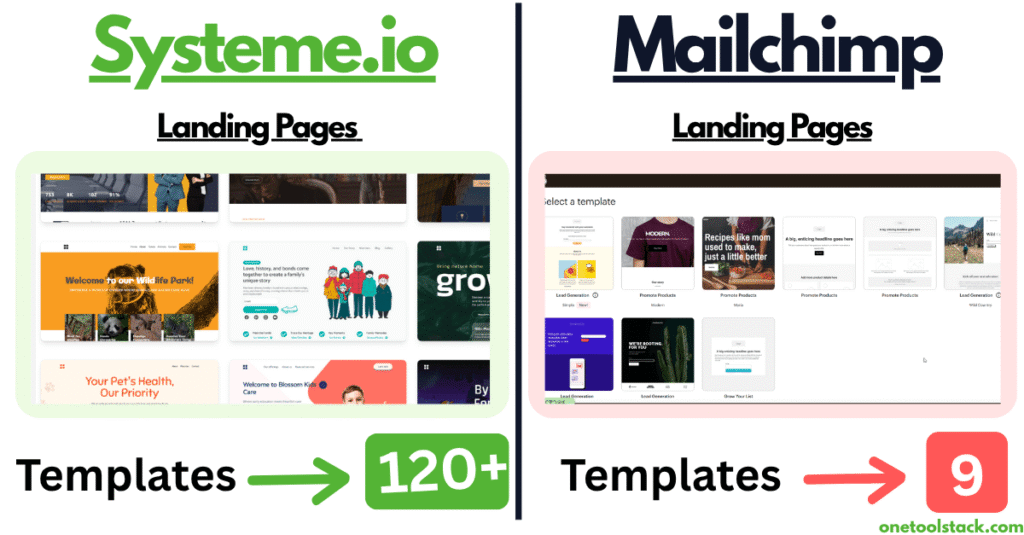
Comparison: Systeme.io has 100+ funnel templates. ClickFunnels has 100+ templates. Mailchimp has… 1 template and a prayer.
Verdict: Only use this if you literally have no other option. Better alternatives exist for free.
🤖 Creative Assistant AI (Rating: 0/10)
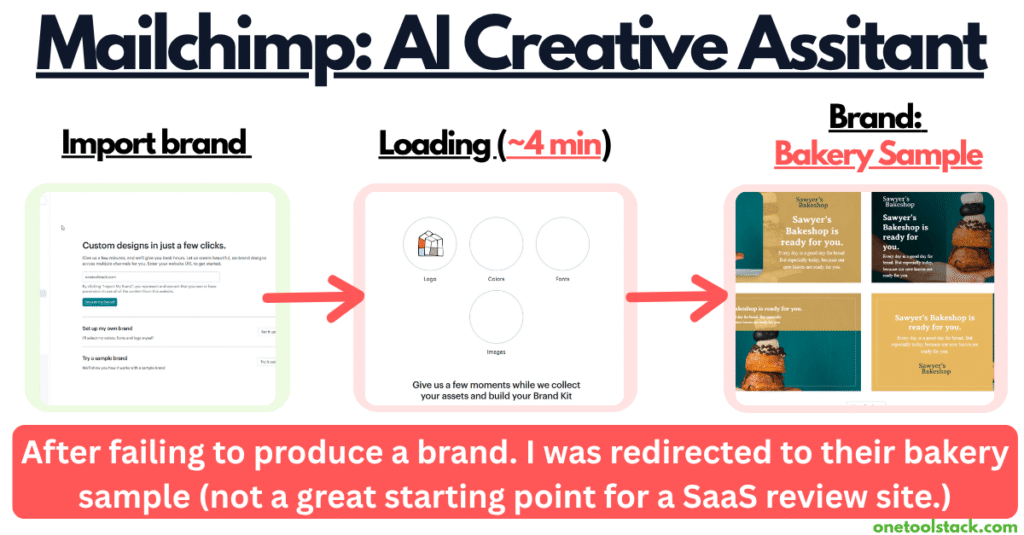
Mailchimp promises an AI tool that will “import your brand and create templates that save you HOURS.”
I was excited. AI-powered design? Hell yeah, let’s go.
What actually happened:
- Loaded my website URL
- Waited 3 minutes while it spun
- Got an error: “Wasn’t able to generate anything.” And then built a bakery brand for me.
So instead of importing MY brand, I had it create a generic brand for me (there’s a simple brand generator tool built in that picks colors and fonts).
The results were horrendous.
My site is about SaaS tools for entrepreneurs. It gave me croissants.
This feature is 100% useless. You could spend hours tweaking inputs trying to get something decent, or you could just open Canva and design something yourself in 20 minutes.
Better yet, use Gamma.app which actually has functional AI design tools.
📄 Landing Pages (Rating: 2/10)
Here’s where I got confused.
I thought the “website builder” was their landing page feature. Nope. That’s buried in the Campaigns section…
- Very basic layouts (header + form + maybe 1-2 sections)
- Limited customization
- Mobile-responsive (at least)
Let’s be honest: These aren’t landing pages. They’re forms with lipstick.
A real landing page has:
- Hero section with compelling copy
- Feature/benefit breakdown
- Social proof / testimonials
- FAQ section
- Multiple CTAs
- Visual hierarchy that guides the eye
Mailchimp’s “landing pages” have:
- A header
- A form (name + email)
- Maybe a section or two of description
Comparison:
- ConvertKit has 53 templates (also limited, but better)
- Systeme.io has full sales funnel templates
- ClickFunnels has 100+ landing page templates
Time to create: 30 minutes to build something decent-looking
Verdict: If all you need is a simple opt-in form on a standalone page, these work. But don’t expect to build a proper sales funnel here.
For comparison, see my ClickFunnels vs Systeme.io breakdown to see how template libraries stack up.
📝 Forms & Popups (Rating: 7/10)
Okay, THIS is where Mailchimp actually delivers.
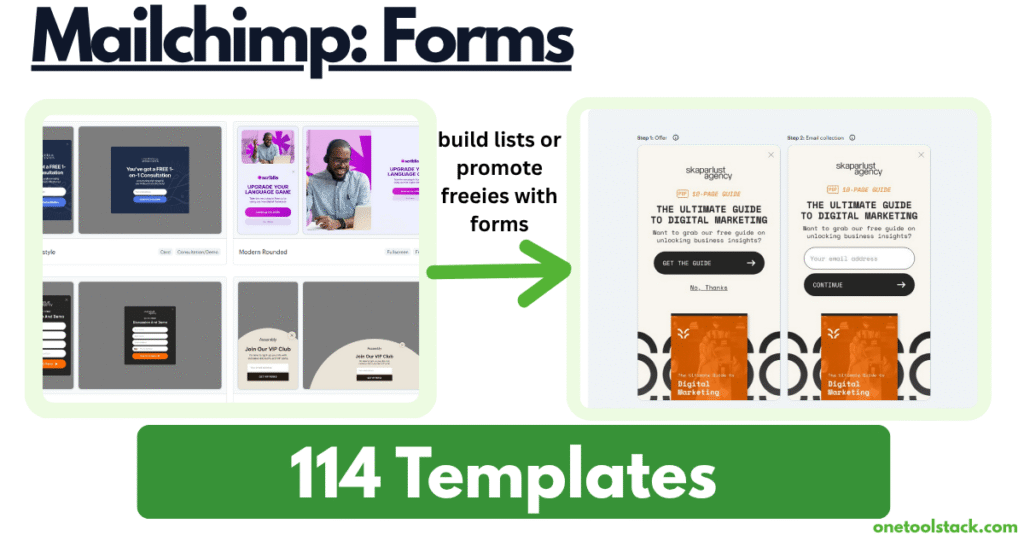
The form and popup builder (currently in beta) is legitimately good. Lots of templates, easy customization, clean design options.
Form types available:
- Embedded forms
- Popup modals
- Slide-ins
- Sticky bars
Template categories:
- Discount offers
- Giveaways
- Newsletter signups
- Product launches
- Event registrations
- And more (lots of options)
What I liked:
- Clean, modern designs
- Mobile-responsive
- Easy to customize
- Specific templates for physical products (this is Mailchimp’s focus)
- Can embed on any website
What I didn’t like:
- Still limited to 1,000 contacts on free plan
- 500 sends per day cap (if you exceed this, you’re locked out)
Verdict: This is the best part of Mailchimp’s free plan. If all you need is embeddable forms for an existing website (WordPress, Squarespace, etc.), Mailchimp’s forms are solid.
But here’s the problem: You’re still capped at 1,000 contacts before you have to pay. Systeme.io gives you 2,000 contacts free with unlimited sends.
📊 Surveys (Rating: 8/10 for specific use case)
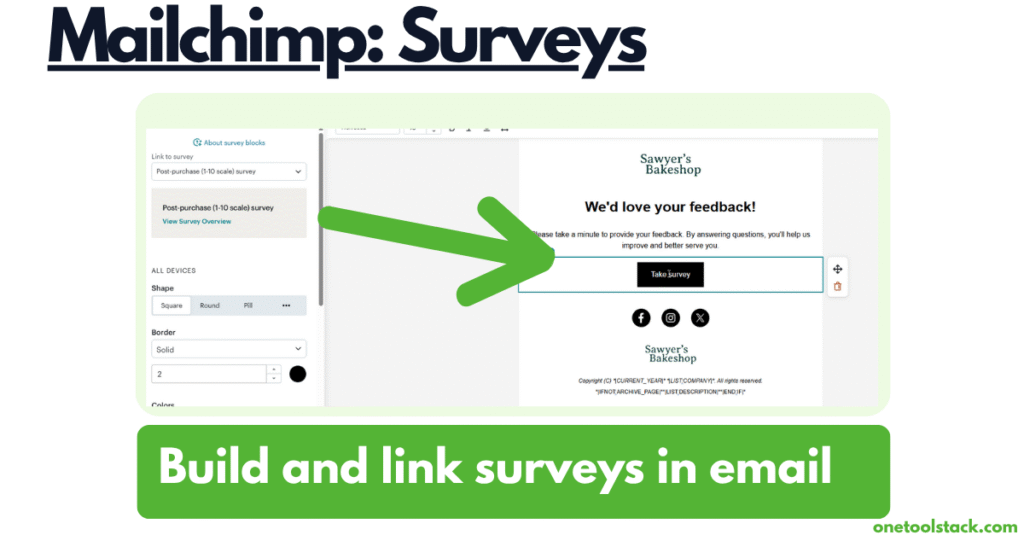
Mailchimp has a survey feature that’s actually pretty solid—IF you’re selling physical products and have an engaged list.
Survey templates:
- Product reviews (“How would you rate what you just bought?”)
- Customer satisfaction
- Feedback requests
- NPS surveys
What I liked:
- Clean design
- Easy to set up
- Good for ecommerce brands
What I didn’t like:
- Geared heavily toward product reviews
- Not super useful if you’re not selling physical products
- You can get similar functionality with Google Forms or Typeform for free
Verdict: If you’re running an ecommerce brand with an engaged email list, this is valuable. If you’re a solopreneur testing a business idea with 0-1,000 contacts, you’re not ready to pay $20-$135/month for survey features you won’t use yet.
Build your list first. Then consider premium survey tools.
📧 Email Templates: Premium vs Free (The Paywall Tease)
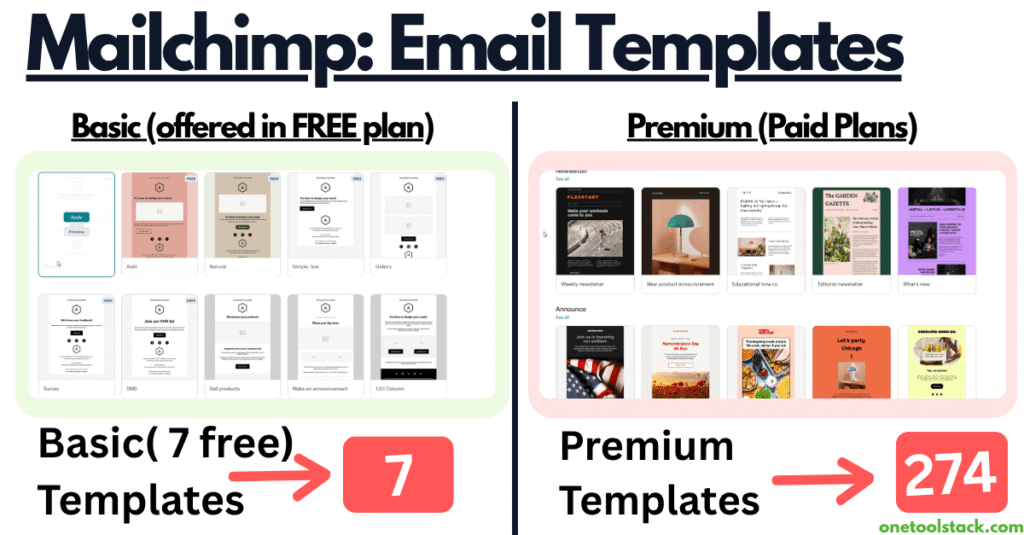
Here’s the most frustrating part of Mailchimp: they DO have something impressive—their premium email template library.
The premium templates (LOCKED):
- Hundreds of professionally designed layouts
- Product showcase templates
- Event invitation designs
- Newsletter templates that look like a design team made them
- The kind of polished emails you’d expect from an established clothing brand
They look REALLY good. Not going to lie.
The free templates (AVAILABLE):
- Basic layouts
- Plain text blocks
- Simple headers
- Standard formatting
- Nothing special
So Mailchimp dangles this beautiful template library in front of you, shows you what’s possible, then says “Pay $20-$135/month to actually use them.”
That’s the strategy: show you premium, lock it behind a paywall, hope you upgrade.
The question: Are fancy email templates worth $240-$1,620/year?
My answer: Hell no. Not for a solopreneur at $0-10K/month.
You can design a clean, professional email in Systeme.io, GetResponse, or Canva for free. Your audience cares about your OFFER, not your template polish.
The exception: If you’re an established physical product brand (clothing, jewelry, home goods) where email is your primary sales channel, Mailchimp’s premium templates might justify the cost. The product showcase layouts are better than most competitors.
But even then:
- GetResponse at $69/mo (5K contacts) also has premium templates
- Systeme.io at $17/mo (5K contacts) has email templates that work
- You’re paying $31-83/mo MORE for marginally better aesthetics
I tested GetResponse for 2 weeks and wrote a detailed GetResponse vs Systeme.io comparison.
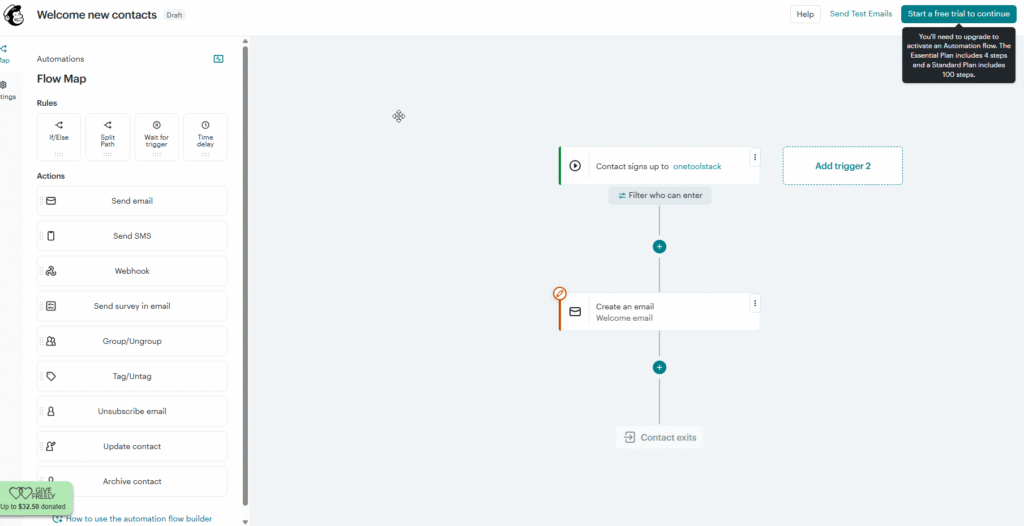
🤖 Automation Templates (Locked on Free Tier)
Mailchimp advertises “powerful automation” but it’s locked behind the paid tier.
What I saw:
- Pre-built automation templates
- Abandoned cart sequences
- Welcome series
- Birthday emails
- Re-engagement campaigns
- Post-purchase follow-ups
They look polished. The templates are well-designed for ecommerce.
But here’s the problem:
- Locked on free tier – You can browse but not use them
- Generic templates – Designed for established ecommerce brands, not solopreneurs testing ideas
- Similar alternatives exist – Systeme.io offers automation rules for FREE/much cheaper
My take: Most automation is use-case specific. Pre-built templates sound helpful, but you’ll end up customizing them heavily anyway. I’d rather build my own in Systeme.io for free than pay $20-$135/month for generic templates I have to rebuild.
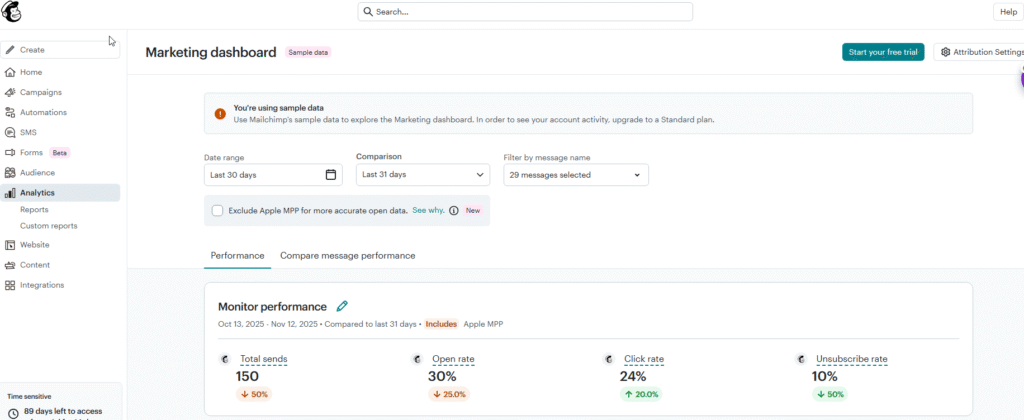
📈 Analytics (Sample Data Only on Free)
Mailchimp advertises “advanced analytics” and “detailed reports.”
On the free plan, you get sample data only.
That’s right—it shows you fake data to demonstrate what the analytics COULD look like if you paid for it.
This is literally a sales pitch disguised as a feature.
I can’t review something I can’t access. Moving on.
The Pricing Disaster: Let’s Do the Math
Okay, time for the uncomfortable conversation about what you’re actually paying for.
Mailchimp Pricing Breakdown
FREE PLAN:
- 1,000 contacts
- 500 sends per day (if you exceed this, account gets locked)
- Basic email templates
- Basic forms & popups
- 1 landing page template
- 1 website
ESSENTIALS PLAN:
- 500 contacts: $13/mo ($156/year)
- 1,500 contacts: $27/mo ($324/year)
- 2,500 contacts: $45/mo ($540/year)
- 5,000 contacts: $75/mo ($900/year)
- 10,000 contacts: $110/mo ($1,320/year)
STANDARD PLAN (Most Popular):
- 500 contacts: $20/mo ($240/year)
- 1,500 contacts: $45/mo ($540/year)
- 2,500 contacts: $60/mo ($720/year)
- 5,000 contacts: $100/mo ($1,200/year)
- 10,000 contacts: $135/mo ($1,620/year)
Systeme.io Pricing Breakdown
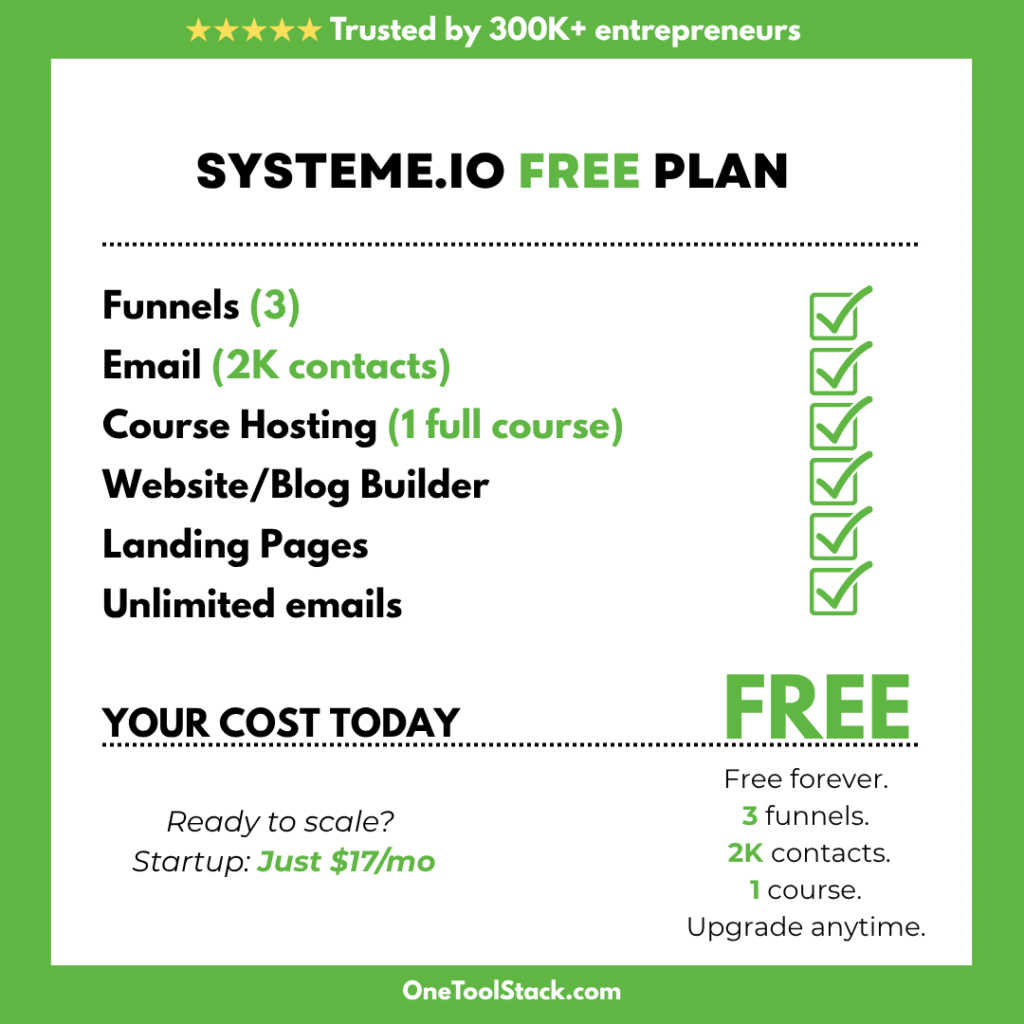
FREE PLAN:
- 2,000 contacts (2X more than Mailchimp)
- Unlimited email sends (no daily cap)
- 3 sales funnels
- Email marketing
- Automation
STARTUP PLAN:
- 5,000 contacts: $17/mo ($204/year)
- Everything from free PLUS:
- 10 funnels
- 3 custom domains
WEBINAR PLAN:
- 10,000 contacts: $47/mo ($564/year)
- Everything from Startup PLUS:
- Evergreen webinars
- 10 custom domains
- 50 funnels
- 100 automations
UNLIMITED PLAN:
- Unlimited contacts: $97/mo ($1,164/year)
- Unlimited everything
The Shocking Comparison: Same Contacts, Wildly Different Prices
Let me make this crystal clear with a visual comparison:
| Contact Count | Mailchimp Standard | Systeme.io | Annual Savings |
|---|---|---|---|
| 500 | $20/mo ($240/year) | FREE (up to 2,000) | Save $240/year |
| 1,500 | $45/mo ($540/year) | FREE (up to 2,000) | Save $540/year |
| 5,000 | $100/mo ($1,200/year) | $17/mo ($204/year) | Save $996/year |
| 10,000 | $135/mo ($1,620/year) | $47/mo ($564/year) | Save $1,056/year |
The $996/Year Question
At 5,000 contacts, you’re choosing between:
Mailchimp Standard: $100/mo ($1,200/year)
- Email marketing
- Forms & popups
- Surveys
- Premium email templates
- Basic automations
- Analytics
Systeme.io Startup: $17/mo ($204/year)
- Email marketing (unlimited sends)
- Sales funnels (10)
- Course hosting
- Webinars (10 evergreen)
- 3 custom domains
- Affiliate management
- 10 Automations
- A/B testing
You save $996/year with Systeme.io.
That’s $996 you could spend on:
- Facebook ads to grow that list ($33/day for 30 days)
- A freelance designer for better graphics
- A VA for 20 hours of work
- Literally anything else that actually grows your business
What do you get for that extra $996/year with Mailchimp?
Prettier email templates. That’s about it.
What Systeme.io Has That Mailchimp Doesn’t
Let’s be clear about what you’re MISSING if you choose Mailchimp:
| Feature | Mailchimp | Systeme.io |
|---|---|---|
| Email Marketing | ✅ | ✅ |
| Forms & Popups | ✅ | ✅ |
| Automation | ✅ (Paid only) | ✅ (Free) |
| Sales Funnels | ❌ | ✅ Unlimited |
| Course Hosting | ❌ | ✅ Unlimited |
| Webinars | ❌ | ✅ Evergreen |
| Blog | ❌ | ✅ |
| Affiliate Management | ❌ | ✅ |
| Email Send Limit | 500/day (free) Varies (paid) | Unlimited |
| Free Tier Contacts | 1,000 | 2,000 |
The reality: Mailchimp is an email marketing tool. That’s it.
Systeme.io is an all-in-one business platform.
If all you need is email marketing, Mailchimp works (but it’s overpriced). If you need to build an actual online business with courses, funnels, and webinars, you HAVE to buy additional tools on top of Mailchimp.
The hidden costs of choosing Mailchimp:
- Mailchimp: $100/mo (5K contacts)
- ClickFunnels: $97/mo (for funnels)
- Teachable: $39/mo (for courses)
- EverWebinar: $41/mo (for webinars)
- Total: $277/month = $3,324/year
vs
- Systeme.io: $17/mo (includes everything)
- Total: $204/year
You’re spending $3,120 MORE per year to cobble together what Systeme.io gives you in one platform.
If You Want Premium, GetResponse Beats Mailchimp
Look, I get it. Maybe you want premium features. You’re willing to pay for quality. You’re past the “broke entrepreneur” stage and ready to invest in better tools.
Don’t pay Mailchimp.
I tested GetResponse for 2 weeks. At 5,000 contacts, GetResponse charges $109/month—Comparable to Mailchimp pricing ($9 more) —and gives you:
- AI-powered campaign builders (that actually work, unlike Mailchimp’s)
- Live webinar hosting (up to 100 attendees)
- Course creator (up to 500 students)
- Better landing page templates (130+ options)
- Advanced automation
- Premium email templates (similar quality to Mailchimp)
- A/B testing
- Advanced analytics
Mailchimp at $100/mo gives you significantly LESS than GetResponse at $109/mo.
That’s the reality.
If you’re going to spend money on a premium email tool, GetResponse is the better investment. The AI features are legitimately helpful (I actually used them). The templates are professional. The automation is more powerful.
The breakdown:
- Mailchimp Standard (5K): $100/mo
- GetResponse Creator (5K): $109/mo
- Slightly more but you get way MORE features.
Who Should Actually Use Mailchimp?
Okay, I’ve been pretty hard on Mailchimp. Let me be fair: there IS a specific use case where Mailchimp might make sense.
Choose Mailchimp IF you check ALL of these boxes:
- ✅ You’re running an established physical product brand (clothing, jewelry, home goods, etc.)
- ✅ Email is your PRIMARY sales channel (80%+ of revenue comes from email campaigns)
- ✅ You already have an existing website built on Shopify, WooCommerce, or similar
- ✅ You need specific ecommerce integrations that Mailchimp specializes in
- ✅ Your list is engaged and you’re already profitable
- ✅ You value premium email templates and are willing to pay for aesthetic polish
- ✅ You have a designer who can create custom email templates (or you outsource this)
If you check 5+ of those boxes, Mailchimp might work for you.
Who Should Use Systeme.io Instead?
Choose Systeme.io IF you check ANY of these boxes:
- ✅ You’re pre-revenue or under $10K/month consistently
- ✅ You’re building a digital business (courses, coaching, info products)
- ✅ You need more than just email (funnels, courses, webinars, blog)
- ✅ Budget is a primary concern (you’re bootstrapping)
- ✅ You want one platform that does everything
- ✅ You value speed to market over aesthetic polish
- ✅ You’re testing a business idea and need to move fast
- ✅ You don’t have a team yet (you’re a solopreneur)
- ✅ You want unlimited email sends without daily caps
- ✅ You want to grow your list to 2,000+ without paying
If you checked 3+ boxes, stay with Systeme.io.
Frequently Asked Questions
Yes. You can export your contact list from Mailchimp (they give you a CSV file) and import it into Systeme.io. You’ll need to rebuild your email sequences and automations, but it’s doable. Takes a few hours but saves you $996+/year.
Both platforms have good deliverability (95-97% based on industry averages). Mailchimp has been around longer and has a strong reputation, but Systeme.io’s deliverability is comparable. The bigger factor is YOUR sending practices (clean list, engaged audience, good content).
Yes, Mailchimp has more native integrations (Shopify, WooCommerce, etc.). If you’re heavily invested in a specific ecommerce platform and need deep integration, Mailchimp might be better. BUT, Systeme.io integrates with Zapier, which connects to 5,000+ apps. So you can still connect most tools you need.
Yes, up to 1,000 contacts and 500 sends per day. But the limitations are significant (no automation, basic templates, daily send cap). Systeme.io’s free plan (2,000 contacts, unlimited sends) is more generous.
Technically yes, but why? You’d be paying for Mailchimp AND using Systeme.io. Just use Systeme.io for everything and save the money.
Run the numbers. How much are you paying per year? What features are you actually using? Could you get the same results with Systeme.io for less? If you’re paying $900-1,200/year and only using basic email marketing, you’re overpaying.
The Bottom Line
After 6 hours of testing Mailchimp over 3 days, here’s what I learned:
Mailchimp isn’t a bad tool. The emails look nice. The forms work. The surveys are solid for ecommerce. The brand has been around since 2001 for a reason.
But Mailchimp is the wrong tool for most solopreneurs in 2025.
If you’re a broke entrepreneur testing a business idea, spending $20-$135/month on Mailchimp is backwards. You’re paying a premium for:
- Features you can’t access (automation on free tier)
- Features you don’t need yet (advanced analytics, surveys)
- Features you can get better elsewhere (landing pages, website builder)
The math is brutal:
- Mailchimp at 5K contacts: $100/mo ($1,200/year)
- Systeme.io at 5K contacts: $17/mo ($204/year)
- You save $996/year
That’s $996 you could spend on ads, content, design, a VA, or anything else that actually grows your business.
My recommendation:
If you’re under $10K/month: Stay with Systeme.io. Use the free plan (2,000 contacts) or Startup plan ($17/mo for 5,000 contacts). Save your money for marketing.
If you’re $10K-50K/month and need premium features: Consider GetResponse ($109/mo) over Mailchimp ($100/mo). You get way more features similar money.
If you’re running an established ecommerce brand with 50K+ contacts: Mailchimp MIGHT make sense if you need their specific integrations and premium templates. But even then, compare to GetResponse first.
For me? I’m staying with Systeme.io. I tested Mailchimp hoping to find something special that justified the price. I didn’t find it.
The brand recognition is strong. The features are basic. The pricing is unjustifiable for my use case.
Save your money. Build your business. Upgrade when the revenue actually justifies it.
Try It Yourself
Want to test both and make your own decision?
Start with Systeme.io: → Try Systeme.io Free (No Credit Card Required) My recommendation for most solopreneurs
Or Compare with Mailchimp: → Try Mailchimp Free (1,000 contacts, 500 sends/day limit)
Full transparency: Some of the links in this article are affiliate links. If you sign up and eventually upgrade to a paid plan, I earn a commission at no cost to you. I only recommend tools I’ve actually tested. I tested Mailchimp for 6 hours hoping to recommend it. I can’t. The pricing doesn’t make sense for most people reading this.
Your support helps me create more honest comparisons like this.
Questions? Disagree with my take? Drop a comment below. I’m figuring this out alongside you, and I’d love to hear your experience if you’ve used either platform.
Last updated: November 12, 2025